
API Endpoints for JSON Datasets
Explore every powerful feature of the Sample JSON API including filtering, deep search, sorting modes, pagination, schema validation, field selection, and invalid JSON diagnostics.
🚀 API Generation
Transform any JSON file into a live REST API within seconds. Simply upload your JSON file and the platform automatically validates the structure, stores the data securely, and generates a unique API endpoint that can be used immediately in browsers, frontend applications, Postman, mobile apps, and testing tools.
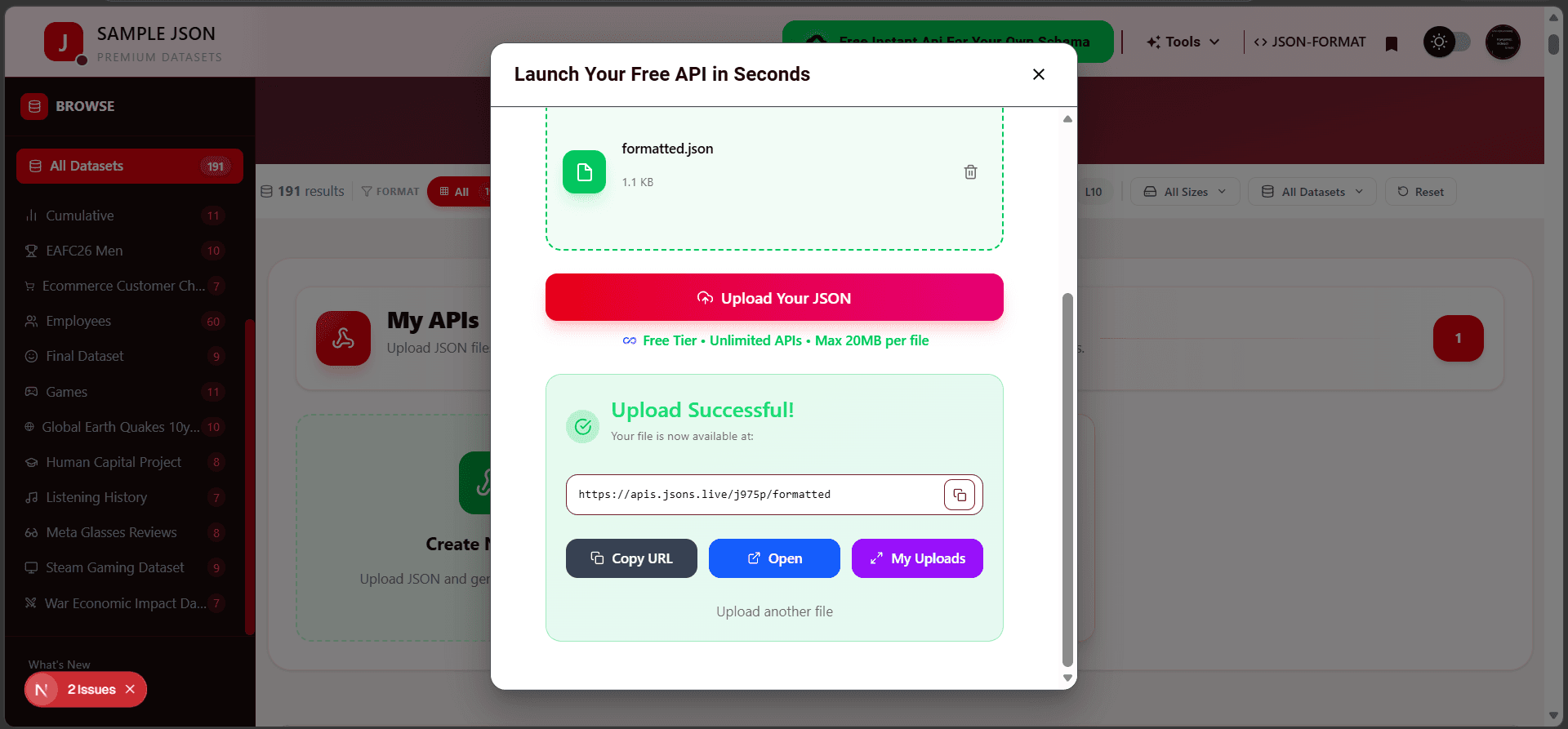
📤 Upload JSON File
Upload a valid JSON file using drag & drop or manual file selection. The system automatically validates the file before processing.
⚡ Instant API Endpoint
Once uploaded successfully, a unique API URL is generated instantly and becomes available for immediate use.
🔒 Automatic Validation
The platform checks JSON format validity and prevents malformed files from being converted into APIs.
🌍 Ready For Integration
Generated APIs can be consumed from React, Next.js, Vue, Angular, Mobile Apps, Postman, Axios, Fetch API, and other HTTP clients.
💡 Why Use Instant API Generation?
Eliminate backend setup, database configuration, route creation, and deployment complexity. Upload your JSON once and start using a production-style API immediately.
📥 GET Method
The GET method is used to retrieve data from a JSON API endpoint. When a GET request is sent, the system reads the corresponding JSON file from storage and returns the data as a structured API response. GET requests are read-only operations, meaning they never modify the original JSON file.
This method is commonly used by frontend applications, mobile apps, dashboards, testing tools, and third-party integrations to fetch and display data. Every generated API endpoint supports GET requests by default, making it easy to access your uploaded JSON data instantly.
🖥️ GET Request Example
Use the following cURL command to retrieve data from your generated API endpoint directly from the terminal.
curl -X GET "https://apis.jsons.live/j975p/formatted"
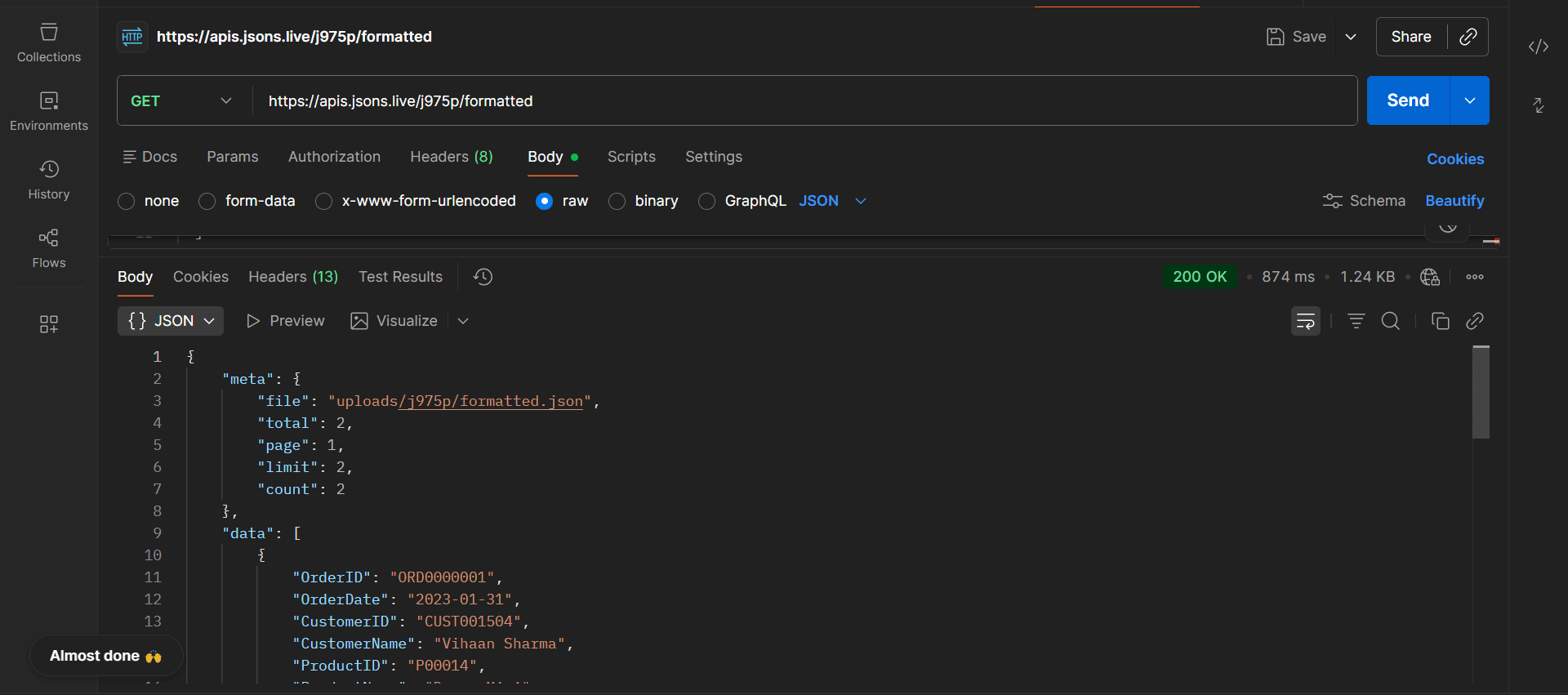
{
        {
    "meta": {
        "file": "uploads/j975p/formatted.json",
        "total": 2,
        "page": 1,
        "limit": 2,
        "count": 2
    },
    "data": [
        {
            "OrderID": "ORD0000001",
            "OrderDate": "2023-01-31",
            "CustomerID": "CUST001504",
            "CustomerName": "Vihaan Sharma",
            "ProductID": "P00014",
            "ProductName": "Drone Mini",
            "Category": "Books",
            "Brand": "BrightLux",
            "Quantity": "3",
            "UnitPrice": "106.59",
            "Discount": "0.0",
            "Tax": "0.0",
            "ShippingCost": "0.09",
            "TotalAmount": "319.86",
            "PaymentMethod": "Debit Card",
            "OrderStatus": "Delivered",
            "City": "Washington",
            "State": "DC",
            "Country": "India",
            "SellerID": "SELL01967"
        },
        {
            "OrderID": "ORD0000002",
            "OrderDate": "2023-12-30",
            "CustomerID": "CUST000178",
            "CustomerName": "Pooja Kumar",
            "ProductID": "P00040",
            "ProductName": "Microphone",
            "Category": "Home & Kitchen",
            "Brand": "UrbanStyle",
            "Quantity": "1",
            "UnitPrice": "251.37",
            "Discount": "0.05",
            "Tax": "19.1",
            "ShippingCost": "1.74",
            "TotalAmount": "259.64",
            "PaymentMethod": "Amazon Pay",
            "OrderStatus": "Delivered",
            "City": "Fort Worth",
            "State": "TX",
            "Country": "United States",
            "SellerID": "SELL01298"
        }
    ]
}
💡 GET Method Overview
A GET request reads data from the API endpoint and returns a structured JSON response containing metadata and the actual dataset. It is the most commonly used HTTP method for fetching information from APIs.
📤 POST Method
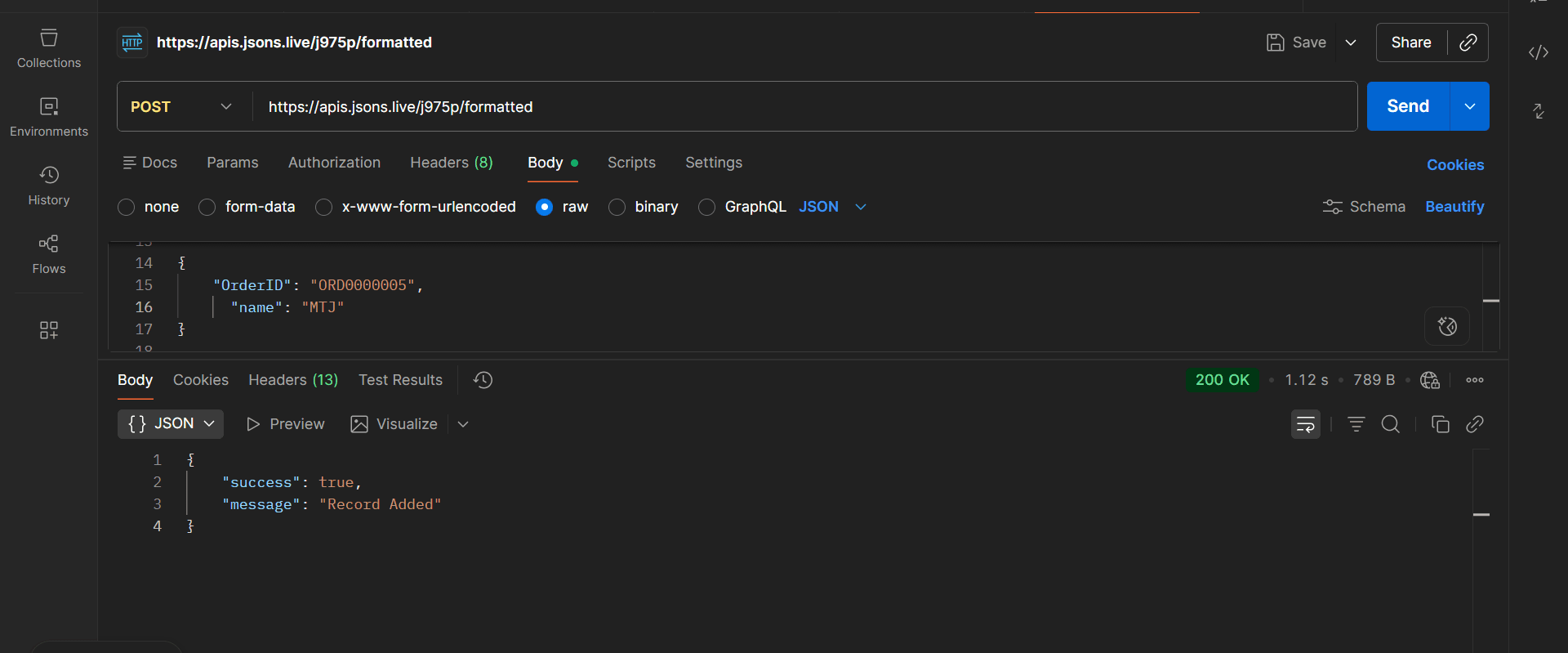
The POST method is used to create and add new records to an existing JSON API endpoint. Unlike GET requests, which only retrieve data, POST requests allow users to send new JSON data to the server and permanently store it inside the uploaded dataset.
When a POST request is received, the platform validates the incoming JSON payload, checks the structure, and appends the new record to the existing dataset. After successful validation, the API returns a confirmation response indicating that the record was added successfully.
➕ Create New Records
Add new JSON objects directly into your uploaded dataset using a simple POST request.
✅ Automatic Validation
Incoming request data is validated before insertion to prevent invalid or malformed records.
⚡ Instant Database Update
Newly added records become available immediately through GET requests and API consumers.
🔒 Secure Data Handling
All POST requests are processed securely and stored safely within the generated API system.
📦 Example Request Body
{
  "OrderID": "ORD000005",
  "name": "MTJ"
}
🖥️ cURL Example
curl -X POST "https://apis.jsons.live/j975p/formatted" -H "Content-Type: application/json" -d '{
  "OrderID": "ORD000005",
  "name": "MTJ"
}'
📨 Success Response
{
  "success": true,
  "message": "Record Added"
}
📥 GET Response After Record Creation
After the POST request completes successfully, the newly added record becomes immediately available through GET requests.
  {
    "meta": {
        "file": "uploads/j975p/formatted.json",
        "total": 3,
        "page": 1,
        "limit": 3,
        "count": 3
    },
    "data": [
        {
            "OrderID": "ORD0000001",
            "OrderDate": "2023-01-31",
            "CustomerID": "CUST001504",
            "CustomerName": "Vihaan Sharma",
            "ProductID": "P00014",
            "ProductName": "Drone Mini",
            "Category": "Books",
            "Brand": "BrightLux",
            "Quantity": "3",
            "UnitPrice": "106.59",
            "Discount": "0.0",
            "Tax": "0.0",
            "ShippingCost": "0.09",
            "TotalAmount": "319.86",
            "PaymentMethod": "Debit Card",
            "OrderStatus": "Delivered",
            "City": "Washington",
            "State": "DC",
            "Country": "India",
            "SellerID": "SELL01967"
        },
        {
            "OrderID": "ORD0000002",
            "OrderDate": "2023-12-30",
            "CustomerID": "CUST000178",
            "CustomerName": "Pooja Kumar",
            "ProductID": "P00040",
            "ProductName": "Microphone",
            "Category": "Home & Kitchen",
            "Brand": "UrbanStyle",
            "Quantity": "1",
            "UnitPrice": "251.37",
            "Discount": "0.05",
            "Tax": "19.1",
            "ShippingCost": "1.74",
            "TotalAmount": "259.64",
            "PaymentMethod": "Amazon Pay",
            "OrderStatus": "Delivered",
            "City": "Fort Worth",
            "State": "TX",
            "Country": "United States",
            "SellerID": "SELL01298"
        },
        {
            "OrderID": "ORD0000005",
            "name": "MTJ"
        }
    ]
}
💡 POST Method Overview
Use POST requests whenever you need to create new records inside your generated API. The API validates the incoming data, stores the new record, and immediately makes it available for future GET requests.
✏️ PATCH Method
The PATCH method is used to update existing records inside your generated JSON API. Unlike POST requests which create new records, PATCH requests modify specific fields within an existing record without replacing the entire object.
The API locates the target record using a matching field such as OrderID, UserID, ProductID, or any unique key. Once a matching record is found, the specified fields are updated immediately and become available through future GET requests.
✏️ Update Existing Record
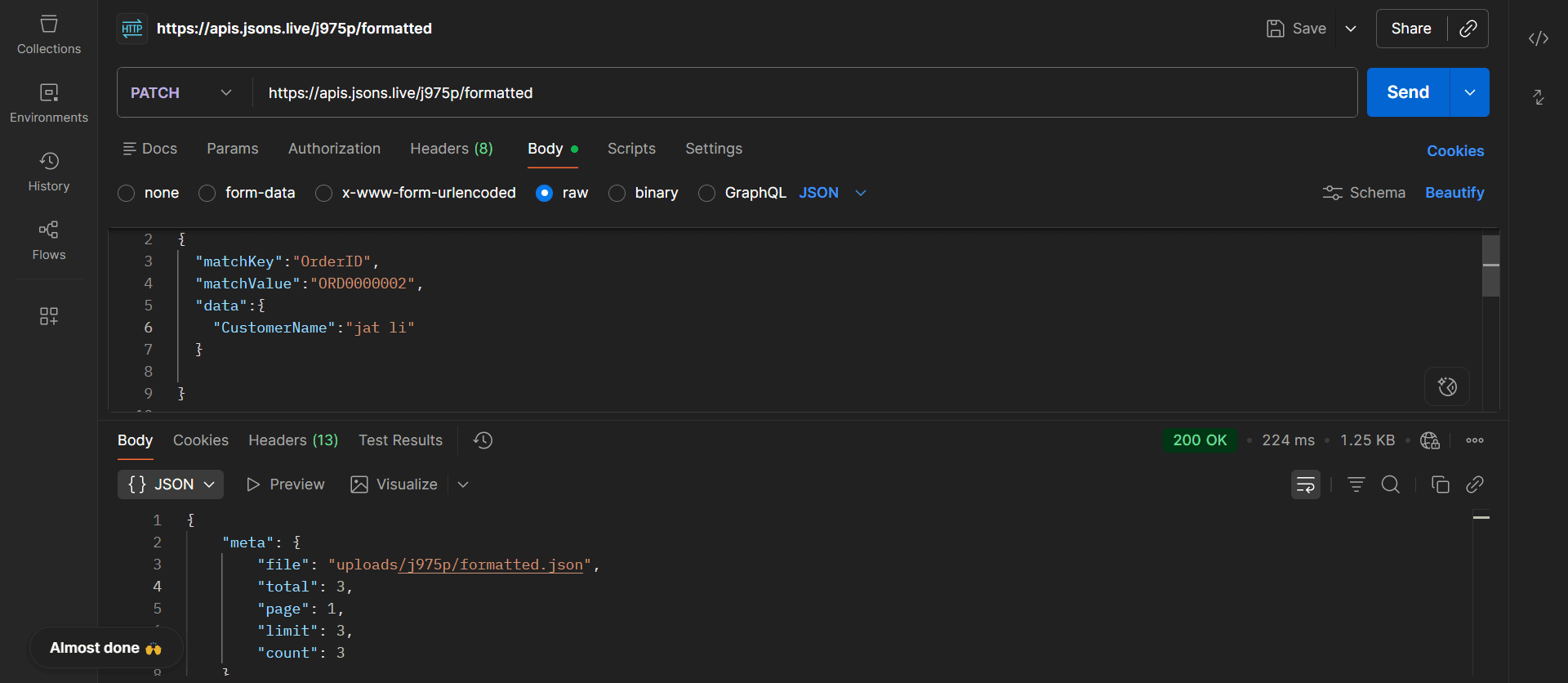
The PATCH method allows developers to update existing records without replacing the entire JSON object. Instead of sending the complete record again, only the fields that need to be modified are included in the request body.
The API locates the target record using a unique field such as OrderID, UserID, ProductID, Email, or any custom identifier. Once a matching record is found, only the specified fields are updated while all remaining properties stay unchanged.
🎯 Example Scenario
A customer updates their profile information and changes their name from Pooja Kumar to jat li. Instead of replacing the entire JSON object, PATCH updates only the CustomerName field.
📦 Example Request Body
{
  "matchKey": "OrderID",
  "matchValue": "ORD0000002",
  "data": {
    "CustomerName": "jat li"
  }
}
🖥️ cURL Example
curl -X PATCH "https://apis.jsons.live/j975p/formatted" \
-H "Content-Type: application/json" \
-d '{
  "matchKey": "OrderID",
  "matchValue": "ORD0000002",
  "data": {
    "CustomerName": "jat li"
  }
}'
📨 Success Response
{
  "success": true,
  "message": "Record Updated"
}
📥 GET Response After Update
After the PATCH request completes successfully, the updated value becomes immediately available through GET requests. In this example, the CustomerName field was changed from "Pooja Kumar" to "jat li".
{
  "meta": {
    "file": "uploads/j975p/formatted.json",
    "total": 3,
    "page": 1,
    "limit": 3,
    "count": 3
  },
  "data": [
    {
      "OrderID": "ORD0000001",
      "CustomerName": "jackie chan"
    },
    {
      "OrderID": "ORD0000002",
      "CustomerName": "jat li"
    },
    {
      "OrderID": "ORD0000005",
      "name": "MTJ"
    }
  ]
}
💡 Edit Record Using PATCH
PATCH is the preferred method for partial updates. Only the fields specified in the request are modified, while all remaining data stays unchanged. This reduces payload size, improves performance, and makes updating JSON records more efficient.
🗑️ Delete Specific Fields
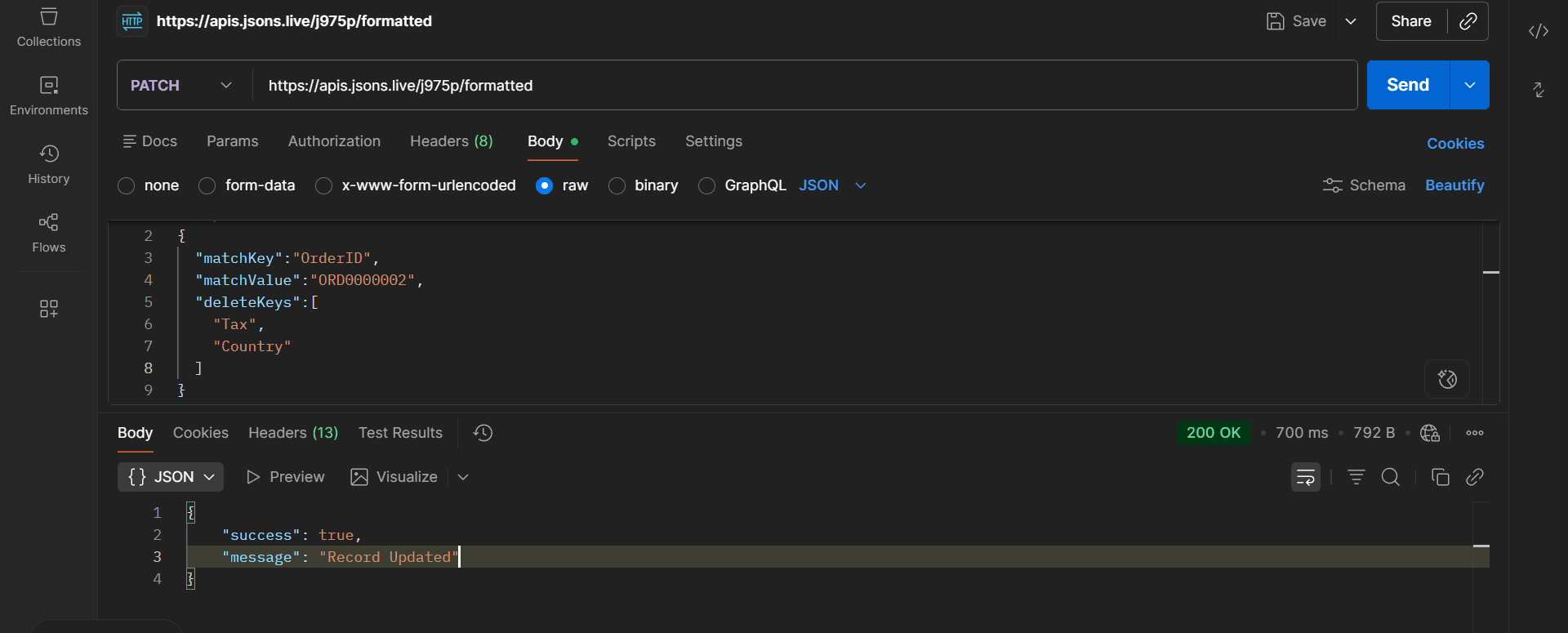
PATCH requests can remove specific fields from an existing record without deleting the entire object. This feature is useful when certain properties are no longer required but the remaining data should be preserved.
By using the deleteKeys array, the API removes only the specified properties while keeping all other fields unchanged. This makes it easy to clean up JSON data without affecting the rest of the record.
🎯 Example Scenario
A record contains Tax and Country fields that are no longer needed. Instead of deleting the entire record, PATCH removes only those specific fields while preserving all remaining data.
📦 Example Request Body
{
  "matchKey": "OrderID",
  "matchValue": "ORD0000002",
  "deleteKeys": [
    "Tax",
    "Country"
  ]
}
🖥️ cURL Example
curl -X PATCH "https://apis.jsons.live/j975p/formatted" \
-H "Content-Type: application/json" \
-d '{
  "matchKey": "OrderID",
  "matchValue": "ORD0000002",
  "deleteKeys": [
    "Tax",
    "Country"
  ]
}'
📨 Success Response
{
  "success": true,
  "message": "Record Updated"
}
📄 Record Before Delete
{
  "OrderID": "ORD0000002",
  "CustomerName": "jat li",
  "Tax": "19.1",
  "Country": "United States"
}
📄 Record After Delete
{
  "OrderID": "ORD0000002",
  "CustomerName": "jat li"
}
📥 GET Response After Delete
{
  "meta": {
    "file": "uploads/j975p/formatted.json",
    "total": 3,
    "page": 1,
    "limit": 3,
    "count": 3
  },
  "data": [
    {
      "OrderID": "ORD0000001",
      "CustomerName": "jackie chan"
    },
    {
      "OrderID": "ORD0000002",
      "CustomerName": "jat li"
    },
    {
      "OrderID": "ORD0000005",
      "name": "MTJ"
    }
  ]
}
💡 Delete Fields Using PATCH
Use deleteKeys when you need to remove specific properties from an existing JSON record. Only the fields listed inside deleteKeys are removed, while all remaining data stays unchanged. This is useful for cleaning unwanted fields without deleting the entire object.
🚀 Update and Delete Together
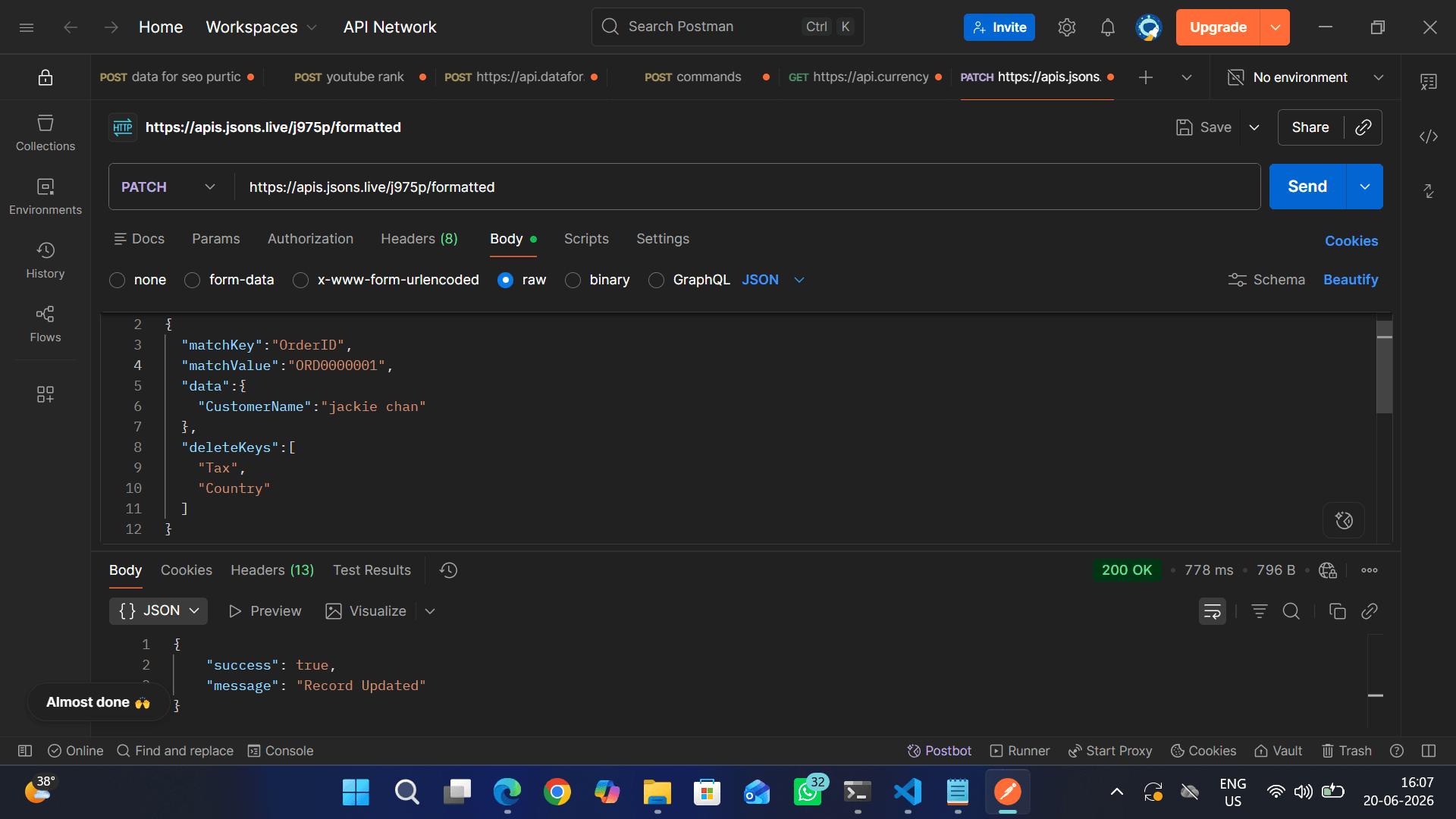
PATCH requests can perform multiple operations in a single API call. Developers can update existing values and remove unwanted fields simultaneously without making separate requests.
This approach improves performance, reduces network traffic, and keeps data modifications consistent. The API updates the specified fields while removing unwanted properties from the same record.
🎯 Example Scenario
A customer changes their name from Vihaan Sharma to jackie chan while the Tax and Country fields are no longer needed. PATCH performs both operations in a single request.
📦 Example Request Body
{
  "matchKey": "OrderID",
  "matchValue": "ORD0000001",
  "data": {
    "CustomerName": "jackie chan"
  },
  "deleteKeys": [
    "Tax",
    "Country"
  ]
}
🖥️ cURL Example
curl -X PATCH "https://apis.jsons.live/j975p/formatted" \
-H "Content-Type: application/json" \
-d '{
  "matchKey": "OrderID",
  "matchValue": "ORD0000001",
  "data": {
    "CustomerName": "jackie chan"
  },
  "deleteKeys": [
    "Tax",
    "Country"
  ]
}'
📨 Success Response
{
  "success": true,
  "message": "Record Updated"
}
📄 Record Before Update
{
  "OrderID": "ORD0000001",
  "CustomerName": "Vihaan Sharma",
  "Tax": "0.0",
  "Country": "India"
}
📄 Record After Update
{
  "OrderID": "ORD0000001",
  "CustomerName": "jackie chan"
}
📥 GET Response After Update
{
  "meta": {
    "file": "uploads/j975p/formatted.json",
    "total": 3,
    "page": 1,
    "limit": 3,
    "count": 3
  },
  "data": [
    {
      "OrderID": "ORD0000001",
      "CustomerName": "jackie chan",
      "ProductName": "Drone Mini"
    },
    {
      "OrderID": "ORD0000002",
      "CustomerName": "jat li"
    },
    {
      "OrderID": "ORD0000005",
      "name": "MTJ"
    }
  ]
}
💡 Update and Delete in One Request
PATCH can update existing values and remove unwanted fields in a single request. This reduces the number of API calls required, improves performance, and keeps JSON data synchronized efficiently.
🗑️ DELETE Method
The DELETE method is used to permanently remove records from an existing JSON API endpoint. Unlike PATCH requests, which modify existing data, DELETE requests completely remove an object from the dataset.
The API locates the target record using a unique identifier such as OrderID, UserID, ProductID, Email, or any custom field. Once a matching record is found, the entire object is removed from the JSON dataset and is no longer available through GET requests.

🗑️ Remove Entire Records
Delete complete JSON objects from your dataset using a matching field and value.
🎯 Precise Record Matching
Records are located using matchKey and matchValue, ensuring only the intended object is removed.
⚡ Instant Dataset Update
Deleted records disappear immediately from future GET requests and API responses.
🔒 Safe Data Management
Only the matching object is removed while the remaining dataset stays unchanged.
📦 Example Request Body
{
  "matchKey": "OrderID",
  "matchValue": "ORD0000001"
}
🖥️ cURL Example
curl -X DELETE "https://apis.jsons.live/j975p/formatted" \
-H "Content-Type: application/json" \
-d '{
  "matchKey": "OrderID",
  "matchValue": "ORD0000001"
}'
📨 Success Response
{
  "success": true,
  "message": "Record Deleted"
}
📄 GET Response After Delete
After deleting OrderID ORD0000001, the object is permanently removed from the dataset. A subsequent GET request will return the updated JSON response without the deleted record.
{
  "meta": {
    "file": "uploads/j975p/formatted.json",
    "total": 2,
    "page": 1,
    "limit": 2,
    "count": 2
  },
  "data": [
    {
      "OrderID": "ORD0000002",
      "CustomerName": "jat li",
      "ProductName": "Microphone"
    },
    {
      "OrderID": "ORD0000005",
      "name": "MTJ"
    }
  ]
}
💡 DELETE Method Overview
Use DELETE requests whenever records are no longer needed in your generated API. The platform searches for the matching object using the provided matchKey and matchValue, removes the entire record, updates the JSON file, and instantly reflects the changes in future GET requests.
🎯 Base API Endpoint
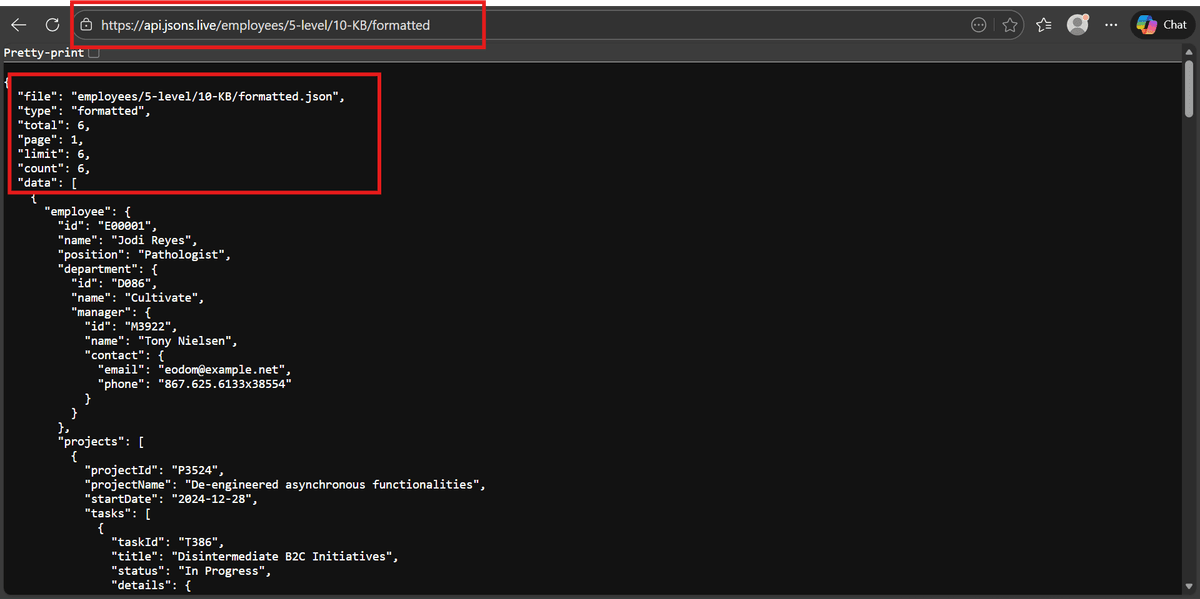
https://api.jsons.live/employees/5-level/10-KB/formatted
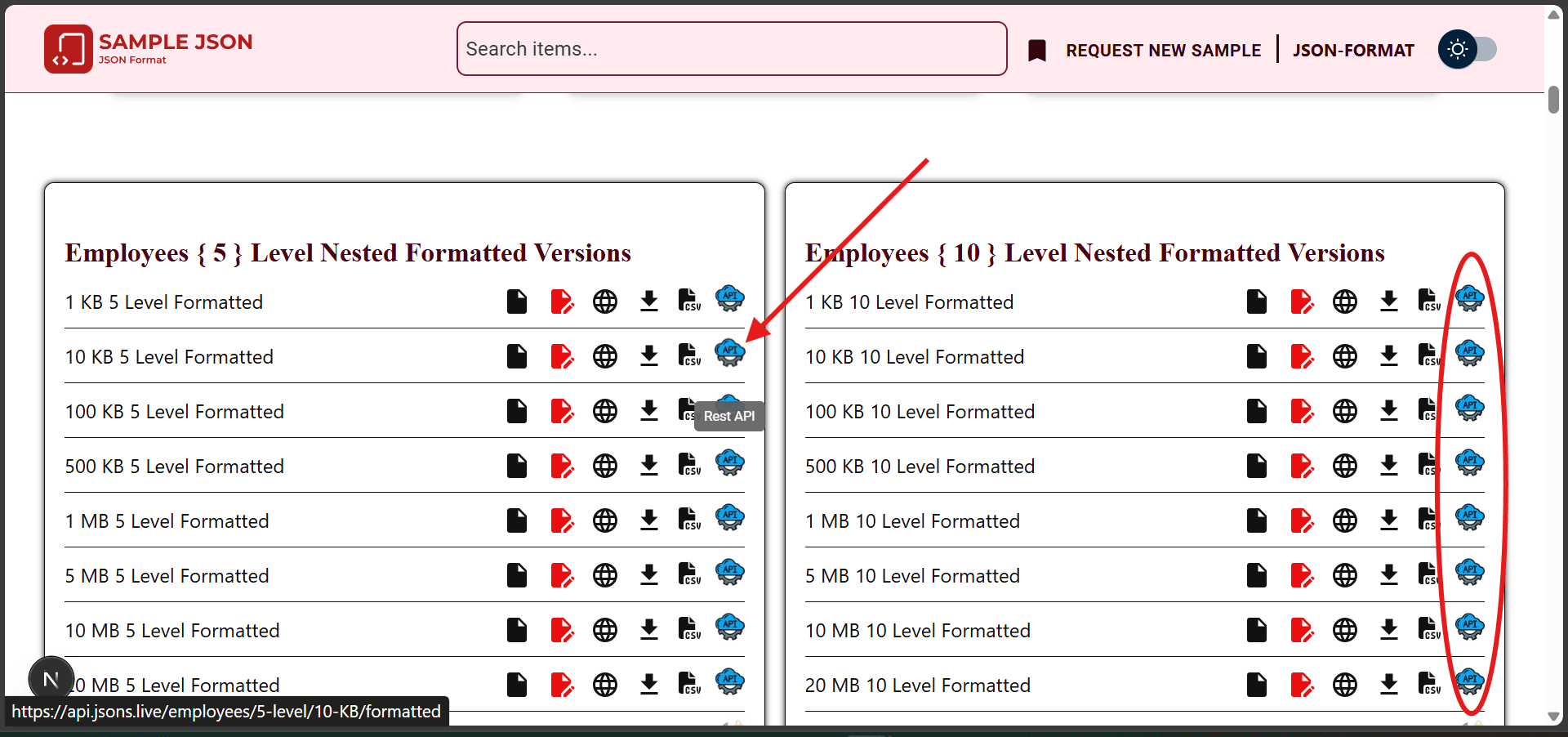
📦 Standard API Response Format
- ✓file – Source JSON file path
- ✓type – JSON type (formatted/minified/invalid)
- ✓total – Total available records
- ✓page – Current page number
- ✓limit – Records per page
- ✓count – Records returned in response
- ✓data – Final processed dataset
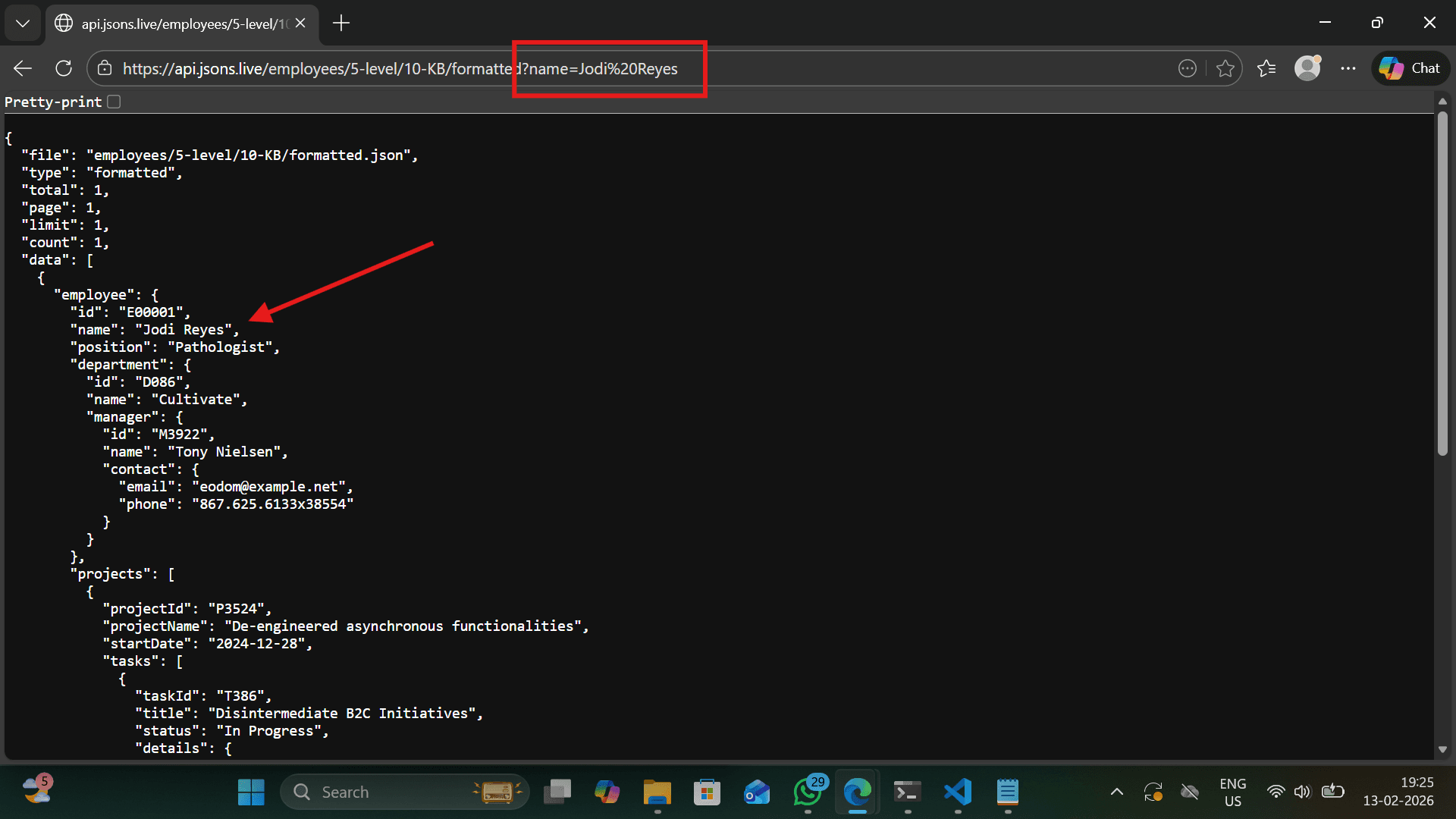
🔍 Single Filter Using Query Parameters
You can filter records by passing a field name and value as a query parameter. The API matches records dynamically.
https://api.jsons.live/employees/5-level/10-KB/formatted?name=Jodi Reyes
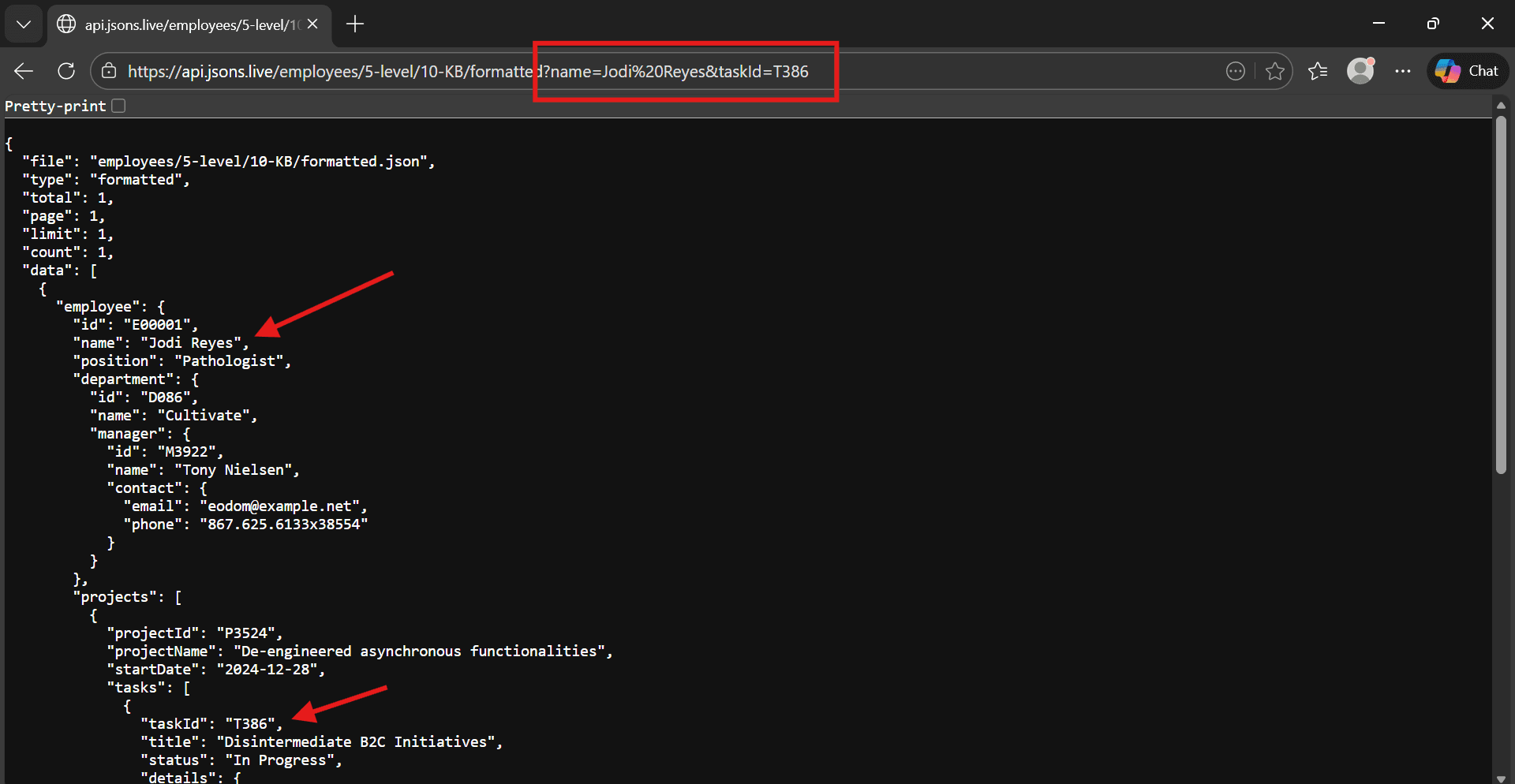
🔗 Multiple Filters – Combined Query Parameters
The API supports multiple filters at the same time. All conditions must match for a record to be included in the response.
https://api.jsons.live/employees/5-level/10-KB/formatted?name=Jodi Reyes&taskId=T386
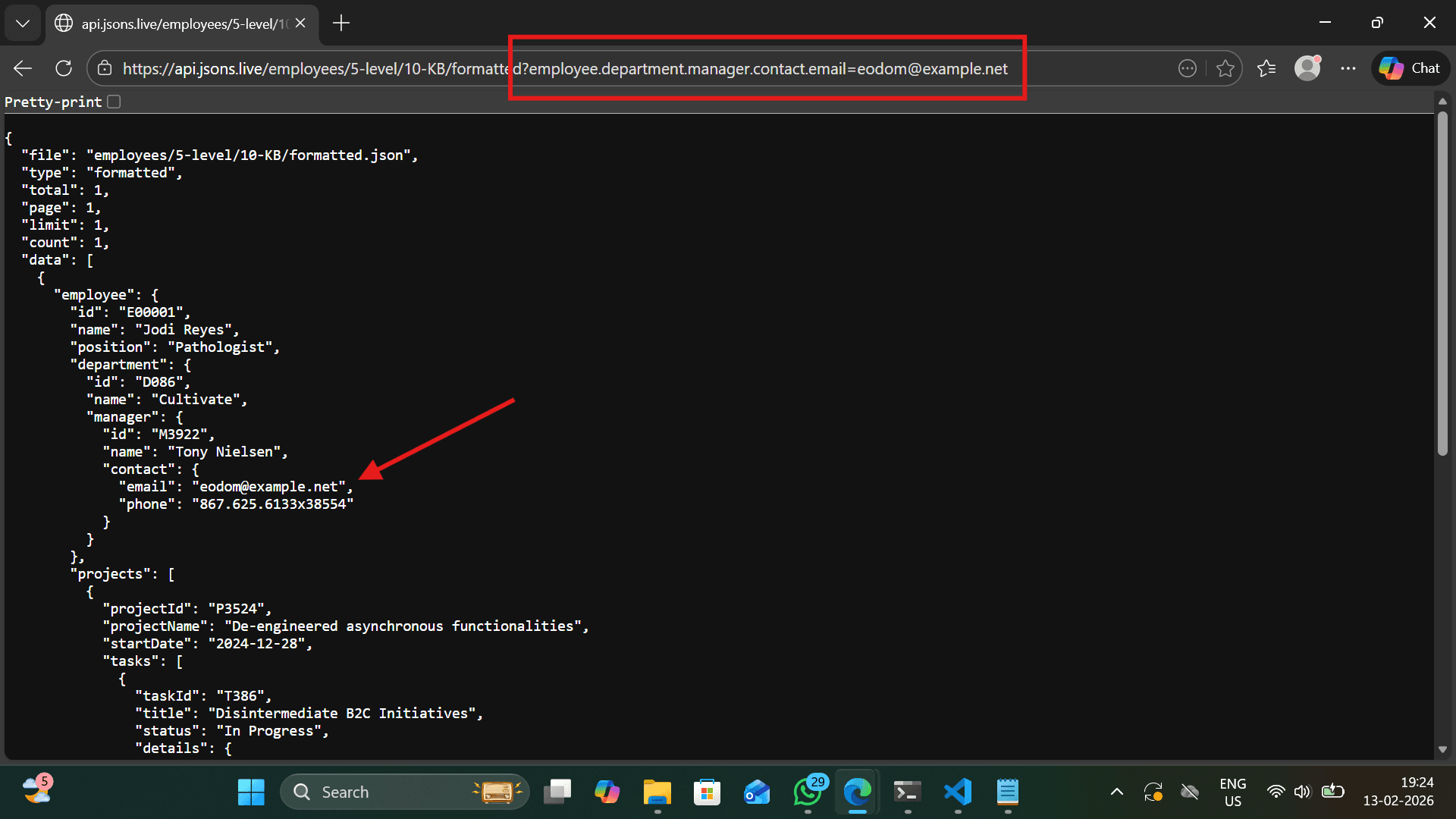
🌳 Nested Field Filtering
Use dot notation to filter deeply nested JSON fields.
https://api.jsons.live/employees/5-level/10-KB/formatted?employee.department.manager.contact.email=eodom@example.net
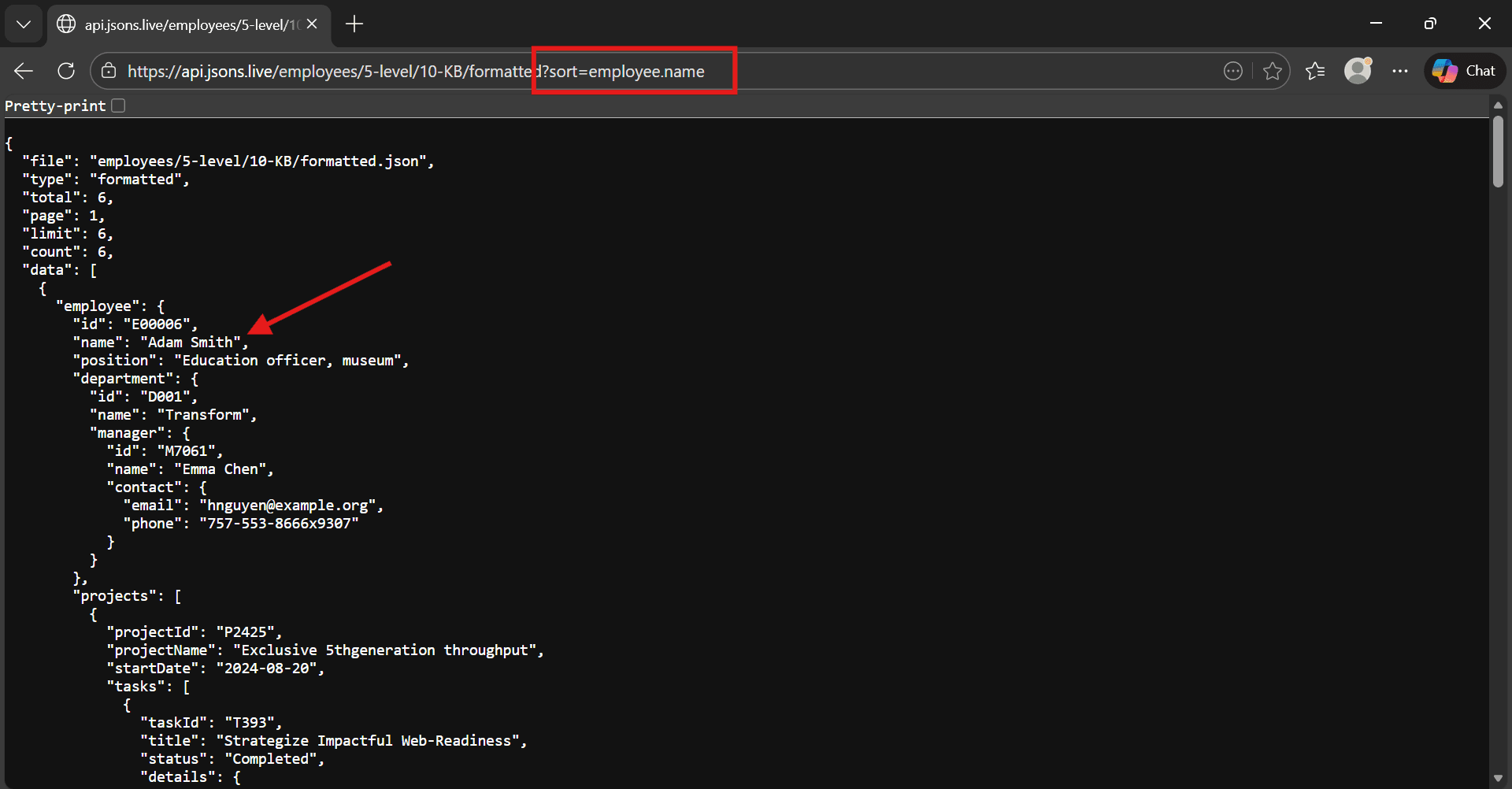
📊 Sorting – Multi Field & Natural Sort
Sort by ascending order A-Z.
https://api.jsons.live/employees/5-level/10-KB/formatted?sort=employee.name
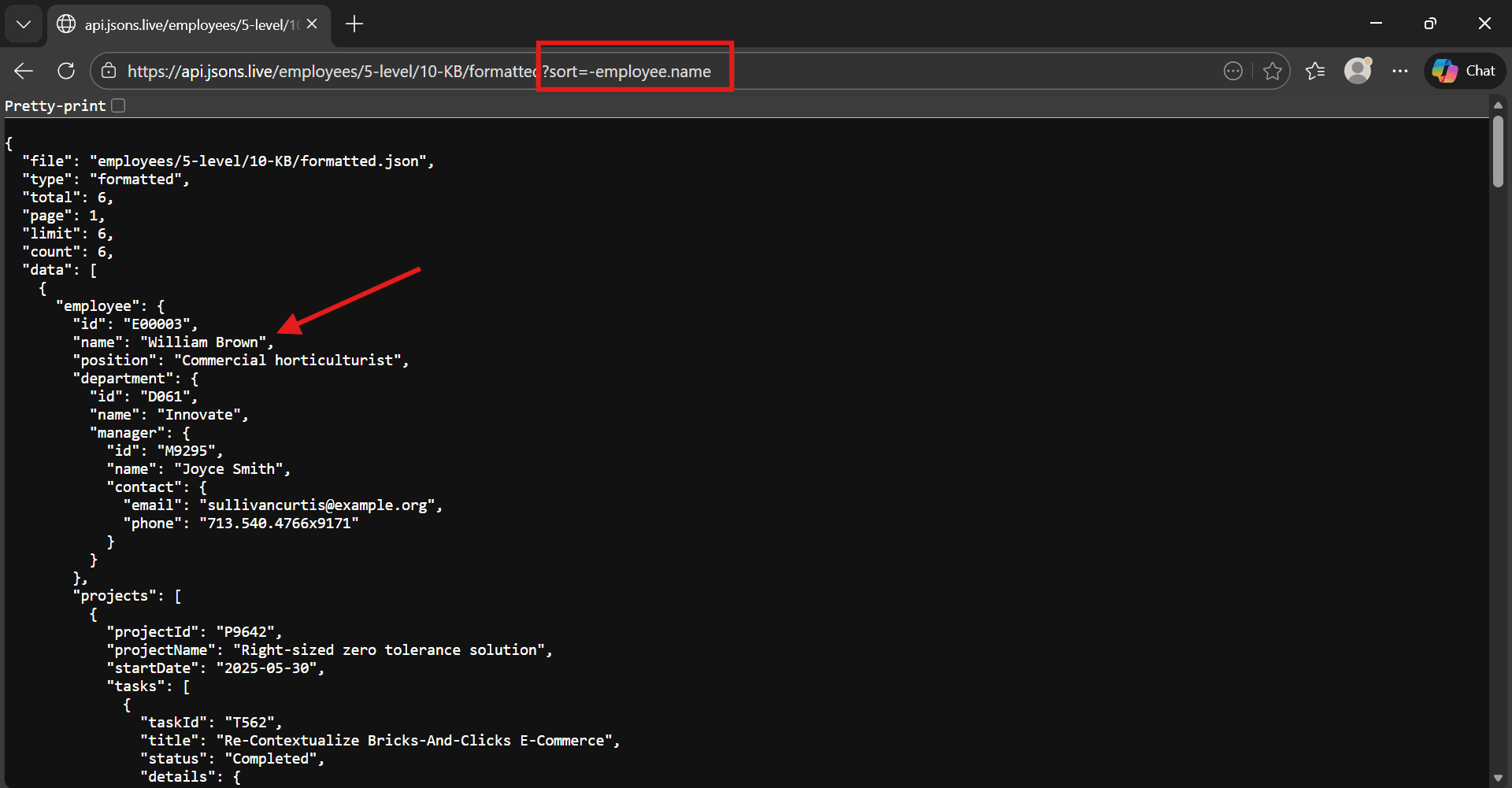
Sort by descending order Z-A.
https://api.jsons.live/employees/5-level/10-KB/formatted?sort=-employee.name
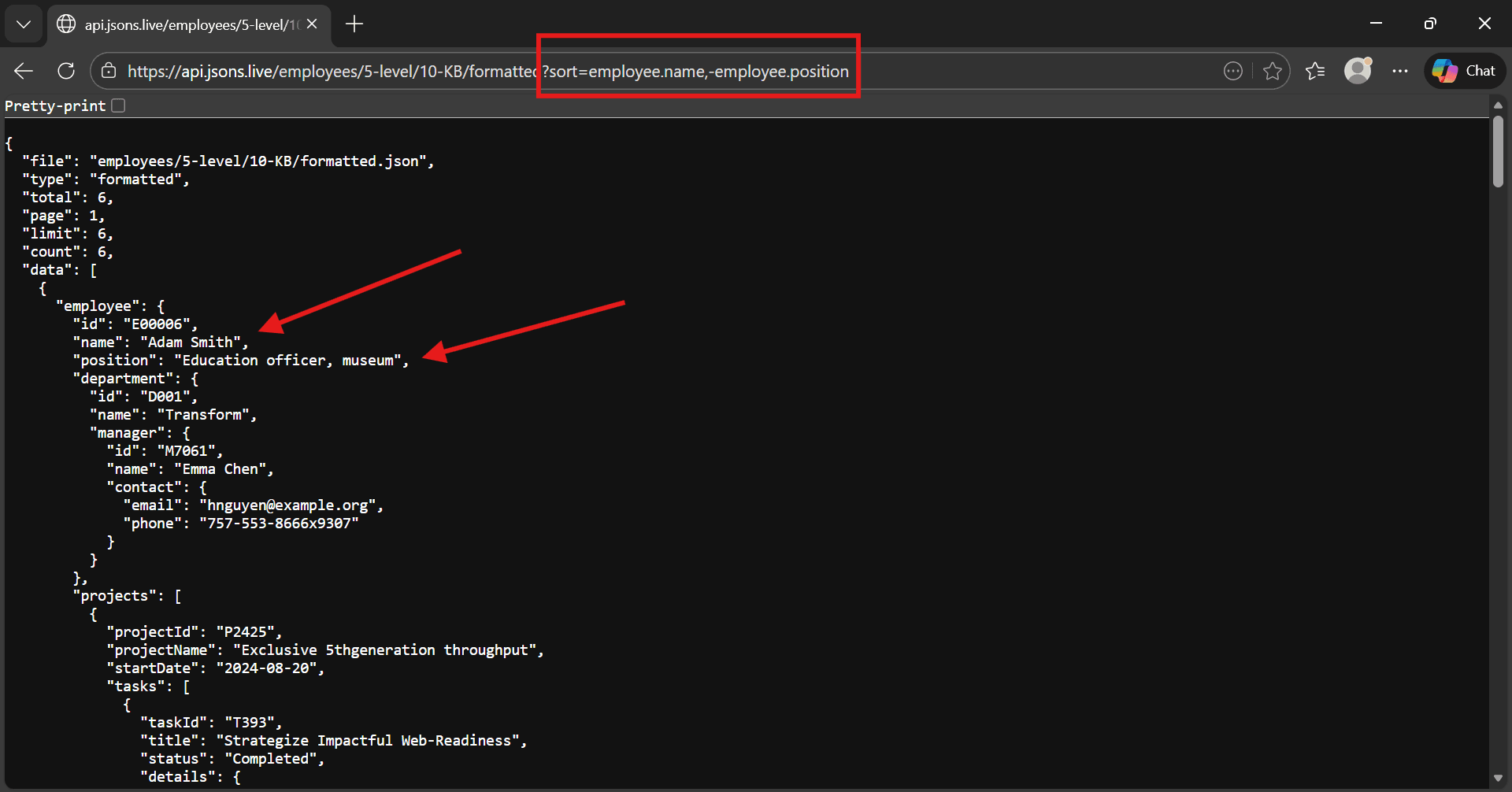
🔄 Multi-Field Sorting
Sort by one or multiple fields. Supports ascending and descending order.
https://api.jsons.live/employees/5-level/10-KB/formatted?sort=employee.name,-employee.position
🔢 Natural Sorting
Ensures numeric values inside strings are sorted correctly (e.g., emp2 before emp10).
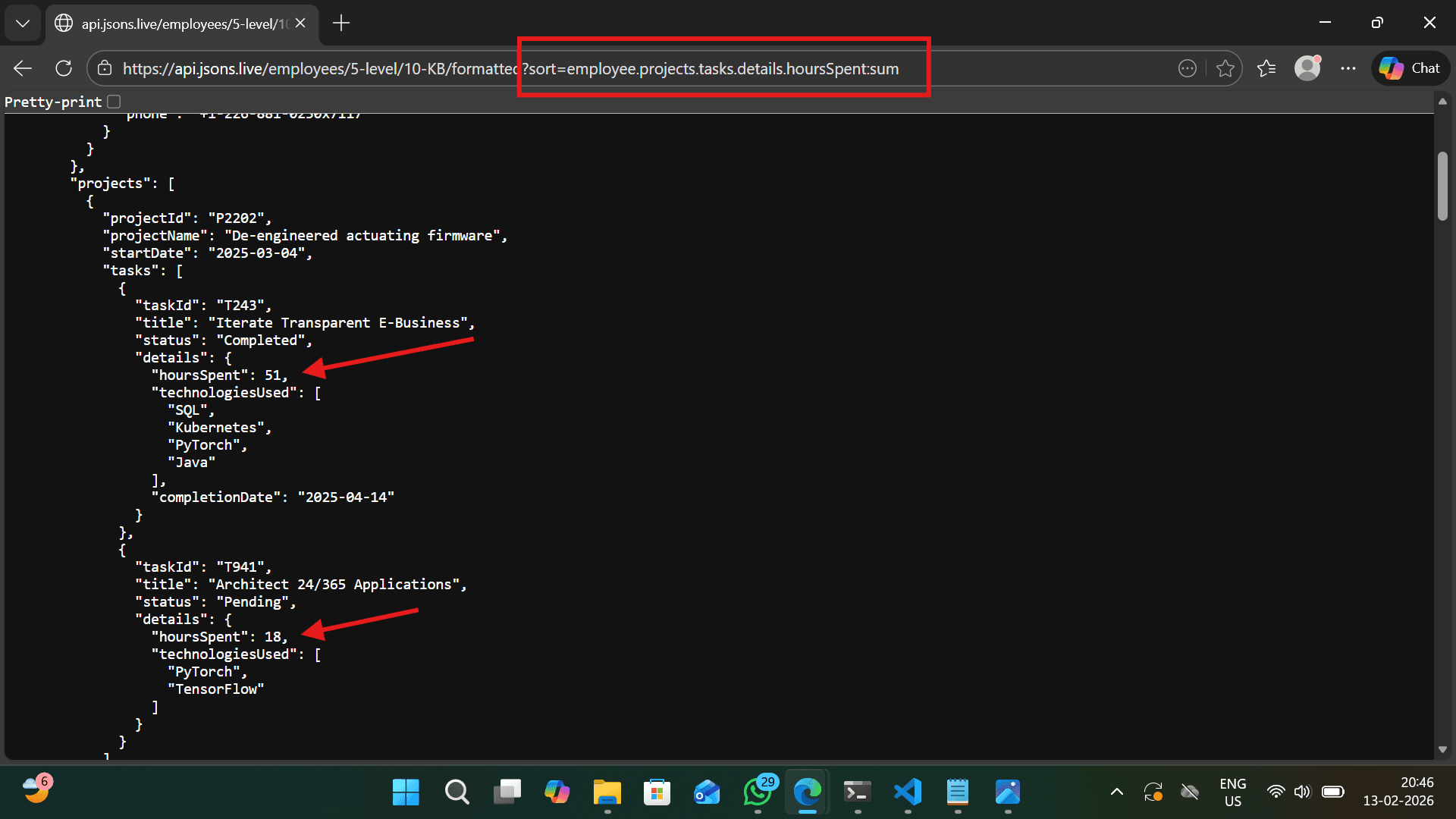
⚡ Advanced Sorting Modes
Sort Modes
- •first – Default value
- •max – Maximum numeric value
- •min – Minimum numeric value
- •sum – Sum of numeric arrays
- •avg – Average of numeric arrays
https://api.jsons.live/employees/5-level/10-KB/formatted?sort=employee.projects.tasks.details.hoursSpent:sum
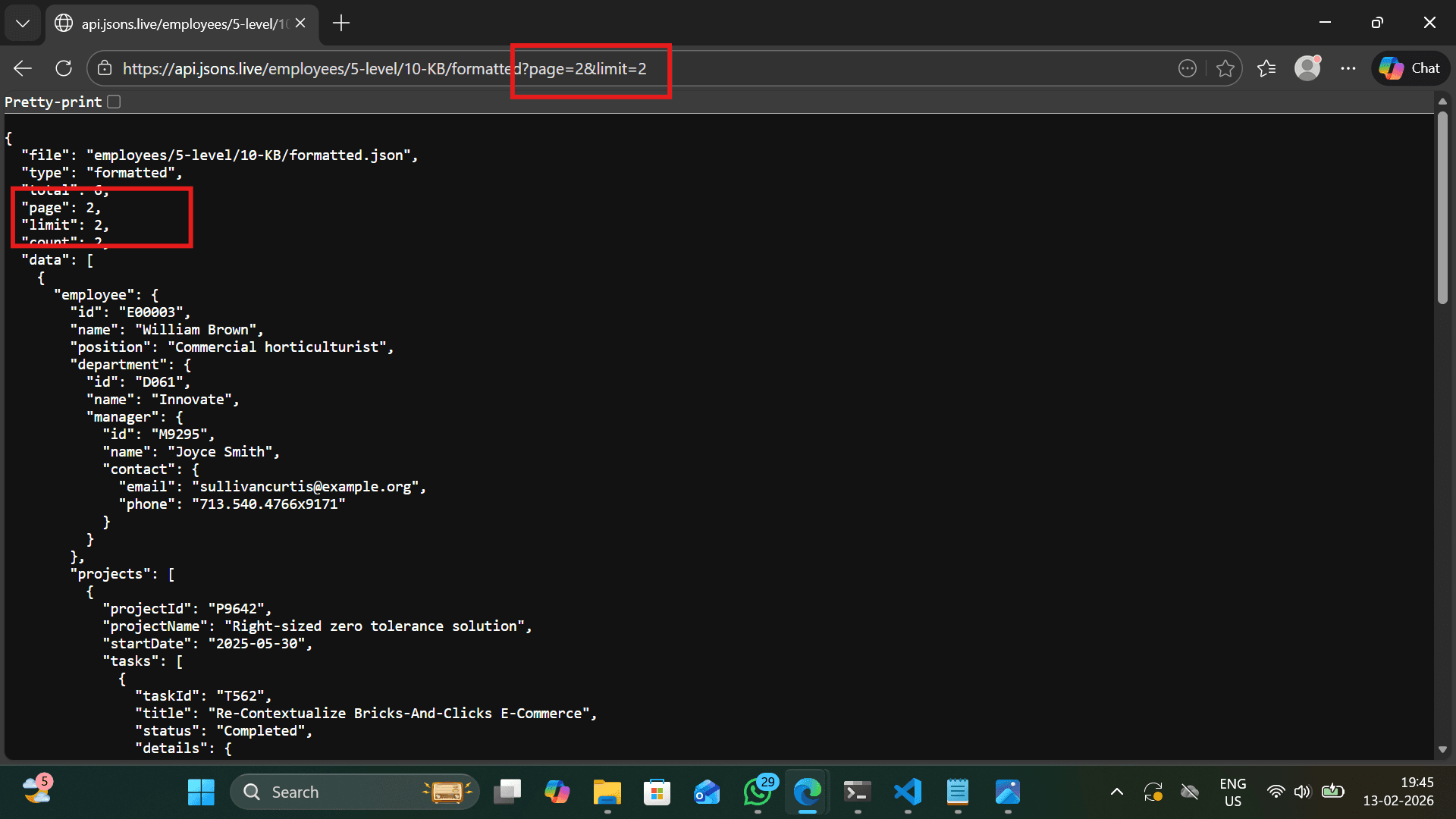
📄 Pagination and Limit
https://api.jsons.live/employees/5-level/10-KB/formatted?page=2&limit=2
⚙️ Limit Parameter – Control Data Size
The limit query parameter controls how many records are returned in a single API call. This is useful for previews, testing, and performance optimization.
https://api.jsons.live/employees/5-level/10-KB/formatted?limit=3

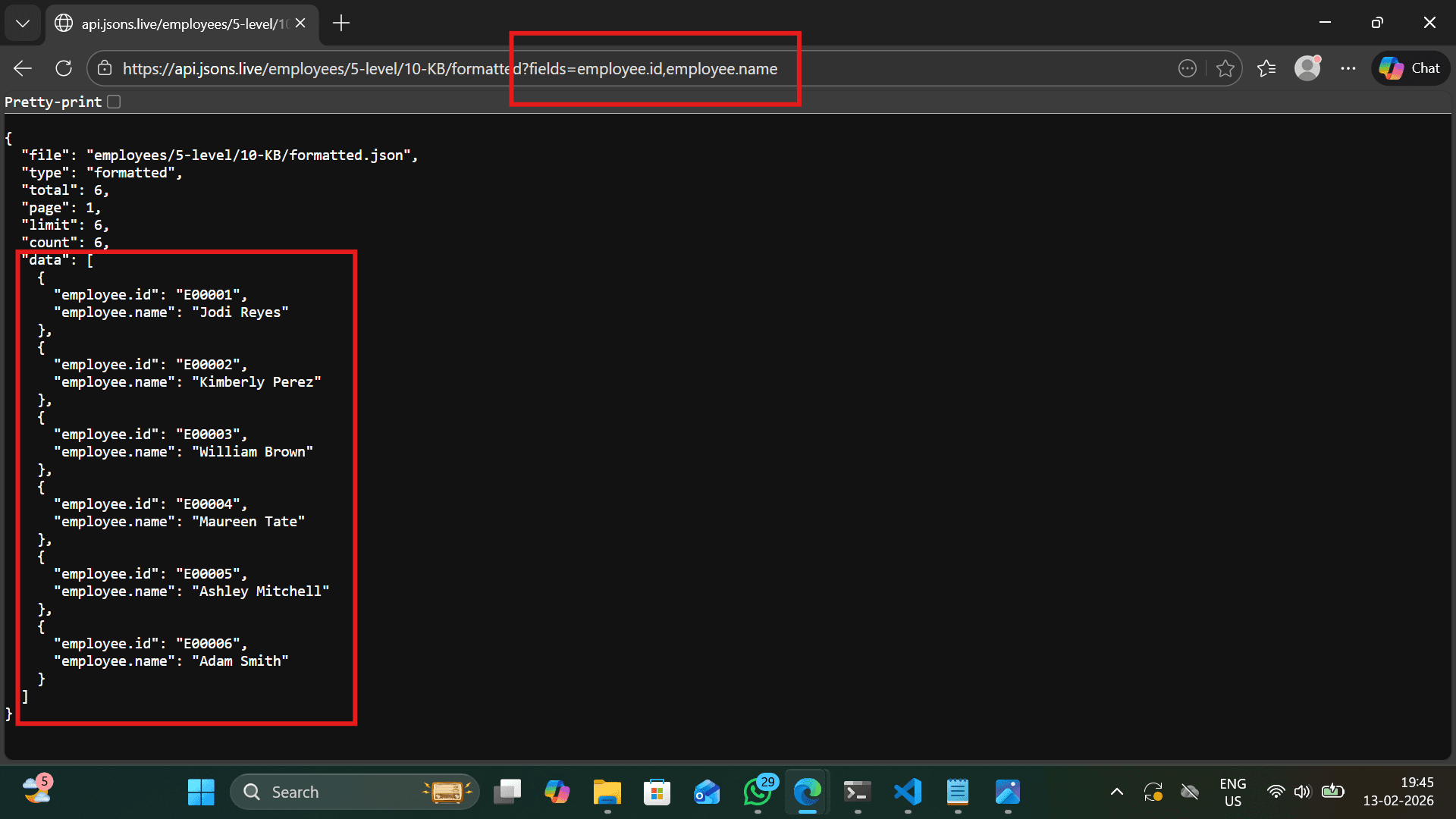
🎯 Field Selection – Return Only What You Need
Reduces payload size and improves performance.
https://api.jsons.live/employees/5-level/10-KB/formatted?fields=employee.id,employee.name
🏷️ Field Alias Support
Short field names are automatically mapped to nested paths.
https://api.jsons.live/employees/5-level/10-KB/formatted?fields=id,name
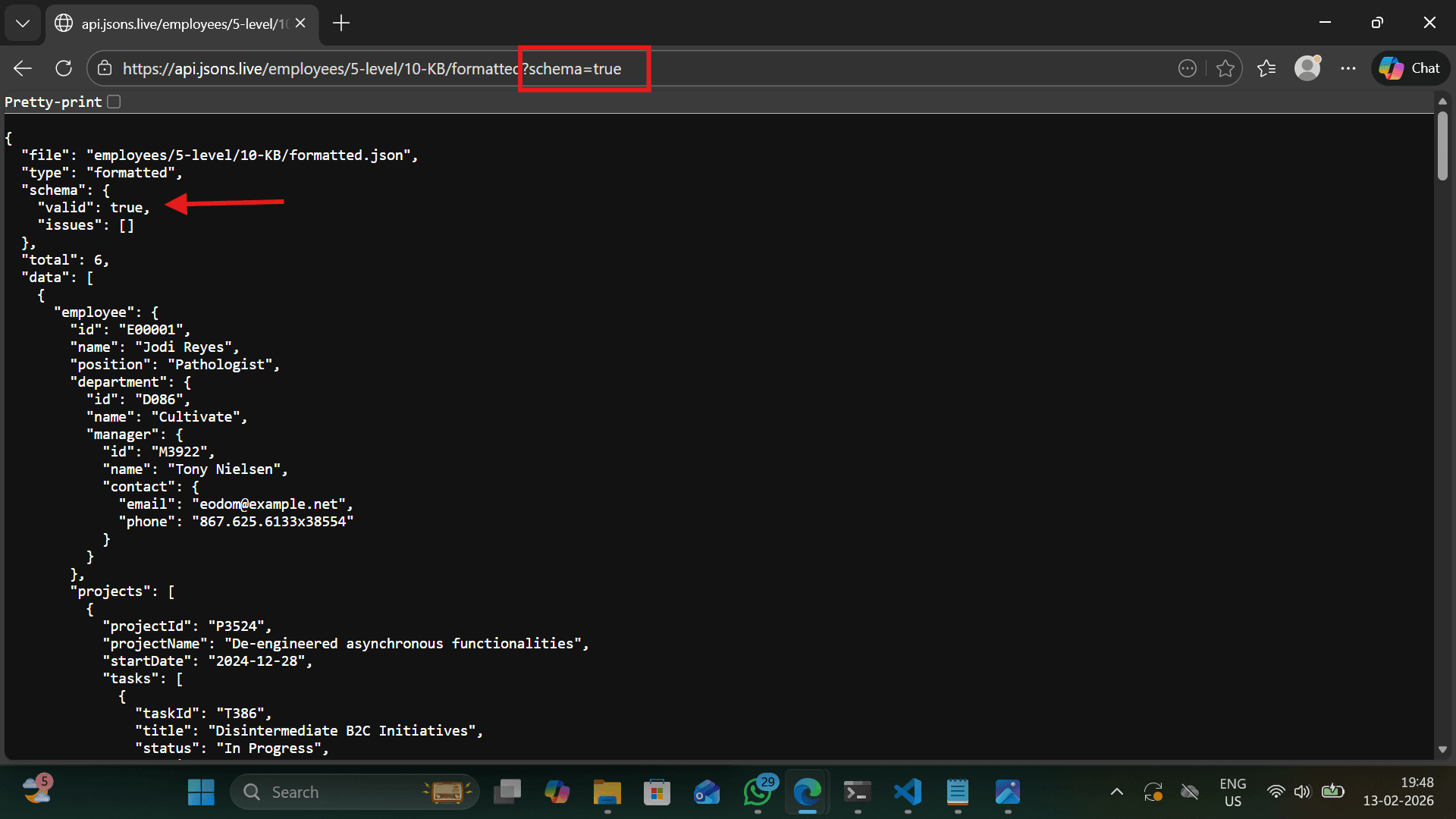
✅ Schema Validation
Validates consistency of field types across all records and reports mismatches.
https://api.jsons.live/employees/5-level/10-KB/formatted?schema=true
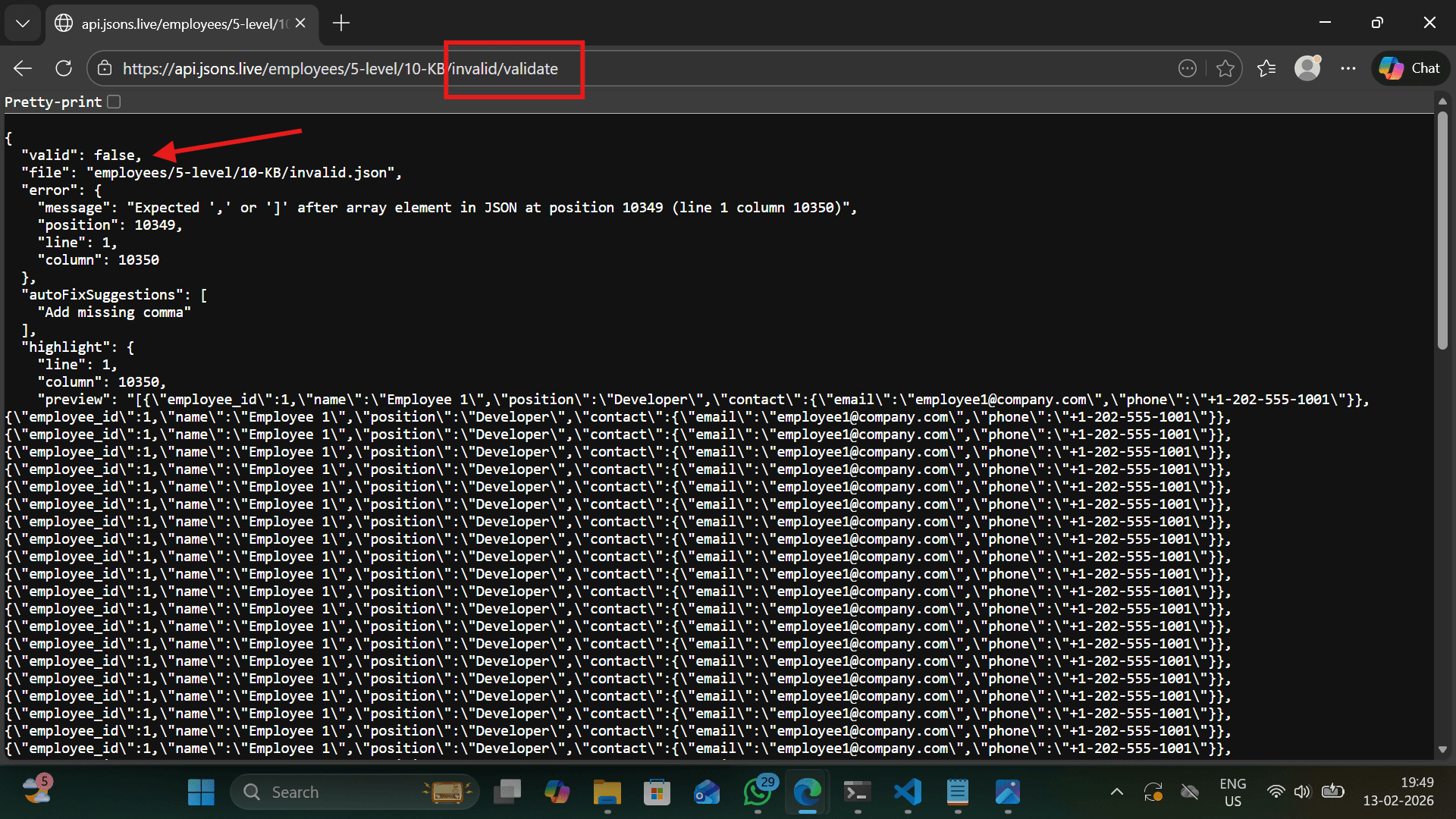
⚠️ Invalid JSON Validation
Invalid JSON datasets can be analyzed and validated using the validate endpoint.
https://api.jsons.live/employees/5-level/10-KB/invalid/validate
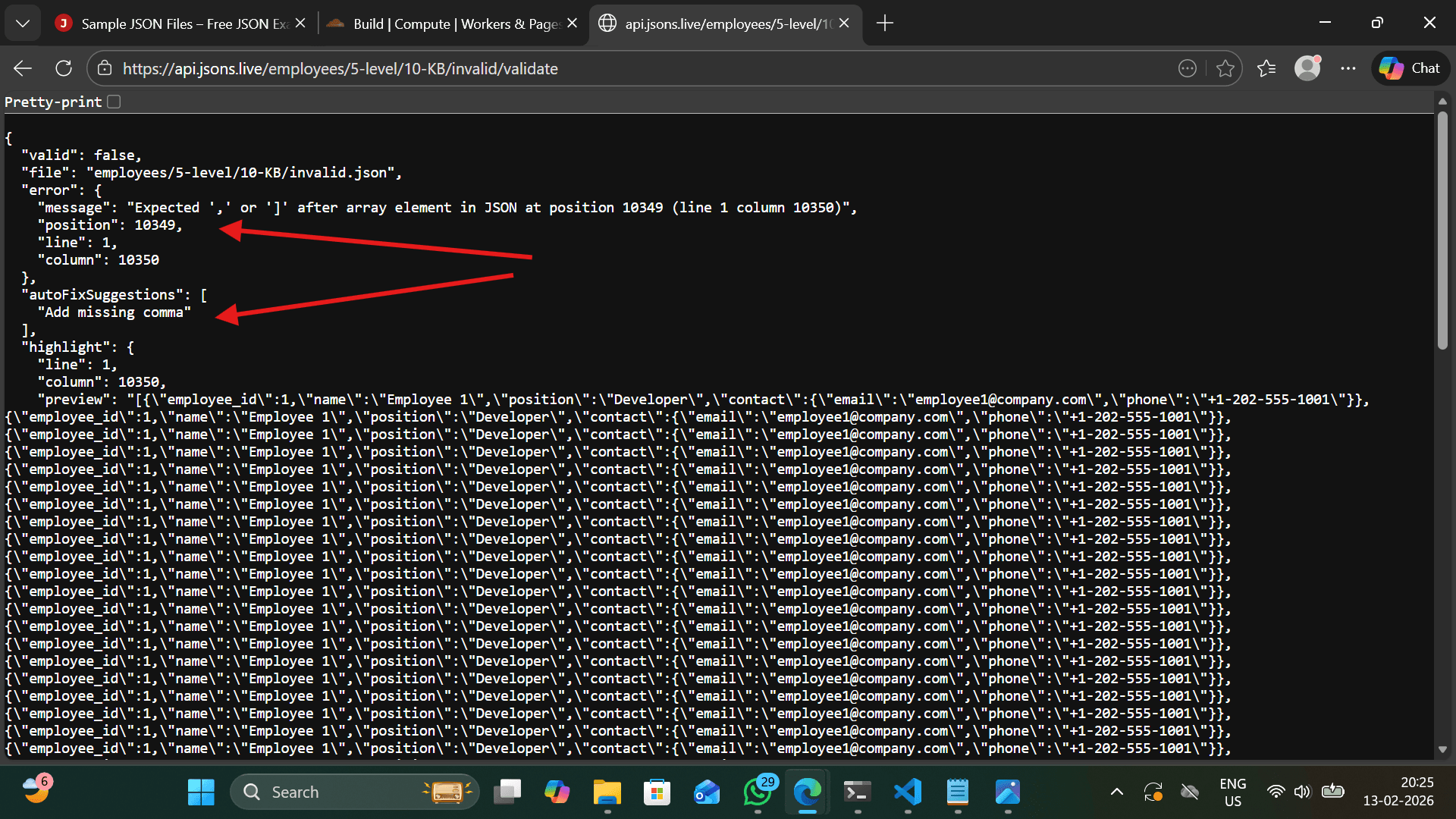
🔦 Error Highlight & Auto Fix Suggestions
Returns exact line, column position, highlights the error, and provides suggestions like missing comma or missing bracket.
Features
- ✓Detects JSON parsing errors
- ✓Extracts exact error position
- ✓Returns line & column number
- ✓Highlights problematic line
- ✓Provides auto-fix suggestions
⭐ Feature List
- →Apply deep recursive filtering
- →Apply dot-path filtering
- →Perform natural multi-field sorting
- →Apply advanced aggregation sorting
- →Apply pagination
- →Select requested fields
- →Validate schema (if requested)
- →Return structured metadata response
💡 Best Practice
Best performance order: Filter → Sort → Paginate → Select Fields.
The Employees API demonstrates a full-featured JSON query engine capable of behaving like a production-grade backend system without a traditional database.
🌟 Key Benefits
💡 Pro Tip
Apply filters before pagination for optimal performance and accurate results.
With advanced query-based API endpoints, Sample JSON now behaves like a production-ready REST API system—empowering developers to build, test, and simulate real-world data workflows effortlessly.
💻 API Usage Examples (JavaScript & Python)
Below are comprehensive examples demonstrating all API features using JavaScript (Fetch API) and Python (Requests library). Each example shows practical usage patterns for real-world applications.
1. Basic API Request
// Basic fetch request
async function fetchEmployees() {
  try {
    const response = await fetch('https://api.jsons.live/employees/5-level/10-KB/formatted');

    if (!response.ok) {
      throw new Error(`HTTP error! status: ${response.status}`);
    }

    const data = await response.json();

    console.log('✅ Success!');
    console.log('Total records:', data.total);
    console.log('Current page:', data.page);
    console.log('Records returned:', data.count);
    console.log('First employee:', data.data[0]);

    return data;
  } catch (error) {
    console.error('❌ Error fetching data:', error.message);
  }
}

// Execute
fetchEmployees();
📤 JavaScript POST Request
const response = await fetch(
  "https://apis.jsons.live/j975p/formatted",
  {
    method: "POST",
    headers: {
      "Content-Type": "application/json"
    },
    body: JSON.stringify({
      OrderID: "ORD000005",
      name: "MTJ"
    })
  }
);

const data = await response.json();
console.log(data);
✏️ JavaScript PATCH Request
const response = await fetch(
  "https://apis.jsons.live/j975p/formatted",
  {
    method: "PATCH",
    headers: {
      "Content-Type": "application/json"
    },
    body: JSON.stringify({
      matchKey: "OrderID",
      matchValue: "ORD0000002",
      data: {
        CustomerName: "jat li"
      }
    })
  }
);

const data = await response.json();
console.log(data);
🗑️ JavaScript DELETE Request
const response = await fetch(
  "https://apis.jsons.live/j975p/formatted",
  {
    method: "DELETE",
    headers: {
      "Content-Type": "application/json"
    },
    body: JSON.stringify({
      matchKey: "OrderID",
      matchValue: "ORD0000001"
    })
  }
);

const data = await response.json();
console.log(data);
2. Filtering Examples
Single Filter
// Filter by exact name match
async function filterByName(name) {
  const response = await fetch(
    `https://api.jsons.live/employees/5-level/10-KB/formatted?name=${encodeURIComponent(name)}`
  );
  const data = await response.json();

  console.log(`Found ${data.count} employees named "${name}"`);
  data.data.forEach(emp => {
    console.log(`  - ${emp.employee.name} (${emp.employee.position})`);
  });
}

filterByName('Jodi Reyes');
Multiple Filters
// Filter with multiple conditions
async function filterMultiple() {
  const params = new URLSearchParams({
    'employee.department.name': 'Engineering',
    'employee.position': 'Senior Developer',
    'sort': '-employee.name'
  });

  const response = await fetch(
    `https://api.jsons.live/employees/5-level/10-KB/formatted?${params}`
  );
  const data = await response.json();

  console.log(`Found ${data.count} senior developers in Engineering`);
  data.data.forEach(emp => {
    console.log(`  - ${emp.employee.name}`);
  });
}

filterMultiple();
Nested Field Filtering
// Filter using dot notation for nested fields
async function filterByManager(email) {
  const response = await fetch(
    `https://api.jsons.live/employees/5-level/10-KB/formatted?employee.department.manager.contact.email=${email}`
  );
  const data = await response.json();

  console.log(`Employees under manager with email ${email}:`);
  data.data.forEach(emp => {
    const manager = emp.employee.department.manager;
    console.log(`  - ${emp.employee.name} (Manager: ${manager.name})`);
  });
}

filterByManager('eodom@example.net');
3. Sorting Examples
Basic Sorting
// Sort ascending (A-Z)
async function sortAscending() {
  const response = await fetch(
    'https://api.jsons.live/employees/5-level/10-KB/formatted?sort=employee.name'
  );
  const data = await response.json();

  console.log('Employees sorted A-Z:');
  data.data.forEach((emp, i) => {
    console.log(`  ${i + 1}. ${emp.employee.name}`);
  });
}

// Sort descending (Z-A)
async function sortDescending() {
  const response = await fetch(
    'https://api.jsons.live/employees/5-level/10-KB/formatted?sort=-employee.name'
  );
  const data = await response.json();

  console.log('Employees sorted Z-A:');
  data.data.forEach((emp, i) => {
    console.log(`  ${i + 1}. ${emp.employee.name}`);
  });
}

sortAscending();
sortDescending();
Multi-Field Sorting
// Sort by multiple fields
async function multiFieldSort() {
  const response = await fetch(
    'https://api.jsons.live/employees/5-level/10-KB/formatted?sort=employee.department.name,-employee.position'
  );
  const data = await response.json();

  console.log('Employees sorted by department (A-Z) and position (Z-A):');
  data.data.forEach(emp => {
    console.log(`  ${emp.employee.department.name} - ${emp.employee.position} - ${emp.employee.name}`);
  });
}

multiFieldSort();
Aggregation Sorting
// Sort by aggregated values
async function sortByTotalHours() {
  const response = await fetch(
    'https://api.jsons.live/employees/5-level/10-KB/formatted?sort=employee.projects.tasks.details.hoursSpent:sum&limit=10'
  );
  const data = await response.json();

  console.log('Employees sorted by total hours worked:');
  data.data.forEach(emp => {
    // Calculate total hours for display
    let totalHours = 0;
    emp.employee.projects?.forEach(project => {
      project.tasks?.forEach(task => {
        totalHours += task.details?.hoursSpent || 0;
      });
    });
    console.log(`  ${emp.employee.name}: ${totalHours} hours`);
  });
}

sortByTotalHours();
4. Pagination Examples
Basic Pagination
// Fetch specific page with custom limit
async function getPage(page = 1, limit = 5) {
  const response = await fetch(
    `https://api.jsons.live/employees/5-level/10-KB/formatted?page=${page}&limit=${limit}`
  );
  const data = await response.json();

  console.log(`Page ${data.page} of ${Math.ceil(data.total / data.limit)}`);
  console.log(`Showing ${data.count} of ${data.total} records`);

  data.data.forEach(emp => {
    console.log(`  - ${emp.employee.name}`);
  });

  return data;
}

// Fetch first 3 pages
async function fetchMultiplePages() {
  for (let page = 1; page <= 3; page++) {
    console.log(`\n📄 Page ${page}:`);
    await getPage(page, 3);
  }
}

fetchMultiplePages();
Infinite Scroll Simulation
// Simulate infinite scroll pagination
async function* paginateGenerator(limit = 5) {
  let page = 1;
  let hasMore = true;

  while (hasMore) {
    const response = await fetch(
      `https://api.jsons.live/employees/5-level/10-KB/formatted?page=${page}&limit=${limit}`
    );
    const data = await response.json();

    yield data;

    hasMore = data.page * data.limit < data.total;
    page++;
  }
}

// Usage
async function loadAllPages() {
  const generator = paginateGenerator(3);

  for await (const page of generator) {
    console.log(`📦 Page ${page.page}: ${page.count} items`);
    page.data.forEach(emp => {
      console.log(`    ${emp.employee.name}`);
    });
  }
}

loadAllPages();
5. Field Selection Examples
// Select specific fields to reduce payload
async function selectFields() {
  // Get only id, name, and position
  const response = await fetch(
    'https://api.jsons.live/employees/5-level/10-KB/formatted?fields=employee.id,employee.name,employee.position&limit=5'
  );
  const data = await response.json();

  console.log('Selected fields only (reduced payload):');
  data.data.forEach(emp => {
    console.log(`  ID: ${emp.employee.id}`);
    console.log(`  Name: ${emp.employee.name}`);
    console.log(`  Position: ${emp.employee.position}`);
    console.log('  ---');
  });

  // Calculate size reduction
  const fullSize = JSON.stringify(data).length;
  console.log(`Response size: ${fullSize} bytes`);
}

selectFields();
Using Field Aliases
// Use short field names (automatically mapped)
async function useAliases() {
  const response = await fetch(
    'https://api.jsons.live/employees/5-level/10-KB/formatted?fields=id,name,position&limit=5'
  );
  const data = await response.json();

  console.log('Using field aliases:');
  data.data.forEach(emp => {
    // Aliases automatically map to nested paths
    console.log(`  ${emp.id}: ${emp.name} - ${emp.position}`);
  });
}

useAliases();
6. Complete JavaScript API Client
// Full-featured API client class
class EmployeesAPI {
  constructor(baseURL = 'https://api.jsons.live/employees/5-level/10-KB/formatted') {
    this.baseURL = baseURL;
    this.cache = new Map();
  }

  async request(params = {}) {
    // Build URL with parameters
    const url = new URL(this.baseURL);
    Object.entries(params).forEach(([key, value]) => {
      if (value !== undefined && value !== null) {
        url.searchParams.append(key, value);
      }
    });

    // Check cache
    const cacheKey = url.toString();
    if (this.cache.has(cacheKey)) {
      console.log('📦 Returning cached response');
      return this.cache.get(cacheKey);
    }

    // Make request
    try {
      const response = await fetch(url);

      if (!response.ok) {
        throw new Error(`HTTP ${response.status}: ${response.statusText}`);
      }

      const data = await response.json();

      // Cache for 5 minutes
      this.cache.set(cacheKey, data);
      setTimeout(() => this.cache.delete(cacheKey), 5 * 60 * 1000);

      return data;
    } catch (error) {
      console.error('❌ Request failed:', error);
      throw error;
    }
  }

  // Filter methods
  async findByName(name, options = {}) {
    return this.request({ 'employee.name': name, ...options });
  }

  async findByDepartment(department, options = {}) {
    return this.request({ 'employee.department.name': department, ...options });
  }

  async findByManager(email, options = {}) {
    return this.request({ 'employee.department.manager.contact.email': email, ...options });
  }

  // Sorting methods
  async getSorted(field, ascending = true, options = {}) {
    const sort = ascending ? field : `-${field}`;
    return this.request({ sort, ...options });
  }

  async getByTotalHours(options = {}) {
    return this.request({
      sort: 'employee.projects.tasks.details.hoursSpent:sum',
      ...options
    });
  }

  // Pagination
  async getPage(page = 1, limit = 10, options = {}) {
    return this.request({ page, limit, ...options });
  }

  async getAllPages(options = {}) {
    const pages = [];
    let page = 1;
    let hasMore = true;

    while (hasMore) {
      const data = await this.getPage(page, 100, options);
      pages.push(...data.data);

      hasMore = data.page * data.limit < data.total;
      page++;
    }

    return pages;
  }

  // Field selection
  async selectFields(fields, options = {}) {
    const fieldsStr = Array.isArray(fields) ? fields.join(',') : fields;
    return this.request({ fields: fieldsStr, ...options });
  }

  // Schema
  async getSchema() {
    return this.request({ schema: 'true' });
  }

  // Utility methods
  async getStats() {
    const data = await this.request({
      fields: 'employee.id,employee.name,employee.projects',
      limit: 100
    });

    const stats = {
      total: data.total,
      withProjects: 0,
      totalHours: 0,
      byDepartment: {}
    };

    data.data.forEach(item => {
      const emp = item.employee;
      const dept = emp.department?.name || 'Unknown';

      // Department count
      stats.byDepartment[dept] = (stats.byDepartment[dept] || 0) + 1;

      // Project stats
      if (emp.projects?.length) {
        stats.withProjects++;
        emp.projects.forEach(project => {
          project.tasks?.forEach(task => {
            stats.totalHours += task.details?.hoursSpent || 0;
          });
        });
      }
    });

    return stats;
  }
}

// Usage example
async function demonstrateAPI() {
  const api = new EmployeesAPI();

  // 1. Find by name
  console.log('🔍 Finding Jodi Reyes...');
  const jodi = await api.findByName('Jodi Reyes');
  console.log('Found:', jodi.data[0]?.employee.name);

  // 2. Get sorted engineers
  console.log('
📊 Engineering department sorted by name:');
  const engineers = await api.findByDepartment('Engineering', {
    sort: 'employee.name',
    limit: 5
  });
  engineers.data.forEach(emp => {
    console.log('  -', emp.employee.name);
  });

  // 3. Pagination example
  console.log('
📄 Page 2 of employees:');
  const page2 = await api.getPage(2, 3);
  page2.data.forEach(emp => {
    console.log('  -', emp.employee.name);
  });

  // 4. Get statistics
  console.log('
📊 Employee Statistics:');
  const stats = await api.getStats();
  console.log('Total employees:', stats.total);
  console.log('Employees with projects:', stats.withProjects);
  console.log('Total hours logged:', stats.totalHours);
  console.log('By department:', stats.byDepartment);
}

// Run the demonstration
demonstrateAPI().catch(console.error);
🚀 Performance Tips
- • Use field selection to reduce payload
- • Set appropriate limits for pagination
- • Cache responses when possible
- • Filter before pagination
🛡️ Error Handling
- • Always use try/catch blocks
- • Check response.ok status
- • Handle rate limiting (429)
- • Implement retry logic
💡 Best Practices
- • Use URLSearchParams for parameters
- • Encode special characters
- • Implement request timeouts
- • Log API responses for debugging
📋 Quick Parameter Reference
| Parameter | Example | Description |
|---|---|---|
| filter | ?name=John | Filter by field value |
| sort | ?sort=-name | Sort (ascending/descending) |
| page | ?page=2 | Page number |
| limit | ?limit=10 | Records per page |
| fields | ?fields=id,name | Field selection |
| schema | ?schema=true | Get JSON schema |